
Download ThePriceGeek – Price Comparison, Market Value, Fair Price
Overview
ThePriceGeek is a desktop utility designed to assist online shoppers and sellers in determining the fair market value of products across major platforms such as eBay, Amazon, and Craigslist. The software aims to prevent overpaying when purchasing new or used items and helps users avoid underselling when listing their own goods. By analyzing current market data, ThePriceGeek provides real-time price insights to support informed decision-making in online transactions.
Target users include individual consumers looking to make smarter purchases, as well as private sellers who want to price their used electronics, gadgets, and other goods competitively. The tool is particularly useful for those frequently buying or selling items online, especially in fast-moving markets like smartphones, tablets, and consumer electronics. The developer, ThePriceGeek, positions the software as a transparent, data-driven solution for pricing confidence in digital marketplaces.
Real-world usage scenarios include checking the resale value of a used iPhone before listing it on Craigslist, comparing prices across multiple platforms before purchasing a new laptop on Amazon, or verifying whether a seller’s asking price on eBay is reasonable. The application integrates directly into the browsing workflow, offering immediate price benchmarks without requiring users to leave their current page.
Key Features & Capabilities
- Real-time Price Benchmarking – The software compares current listings across major online marketplaces to determine average, high, and low price points for a given item, helping users identify fair market value.
- Multi-Platform Support – Designed to work with eBay, Amazon, and Craigslist, ThePriceGeek delivers consistent pricing data regardless of the platform being used.
- Used Item Valuation – Specialized algorithms assess the condition, age, and model of used electronics to provide accurate resale estimates.
- Price Tracker Integration – Users can monitor price fluctuations over time, helping to time purchases or sales for maximum value.
- Browser Extension Compatibility – The application works seamlessly with popular web browsers, allowing instant access to price data while browsing.
These features streamline the decision-making process for both buyers and sellers. For example, a buyer can instantly check if a $999 MacBook listing on Amazon is above or below market average, while a seller can verify whether a $350 price tag on a used iPad aligns with current demand. The integration with web browsing environments ensures minimal disruption to workflow, making ThePriceGeek a practical tool for everyday online commerce.
User Interface, Workflow & Performance
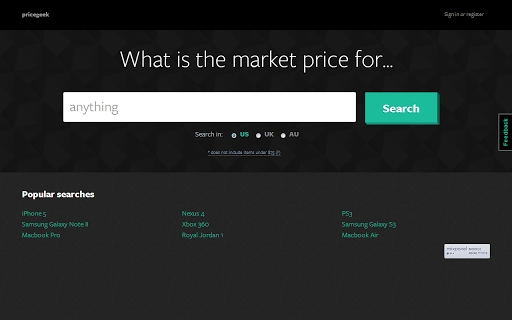
ThePriceGeek features a clean, minimalist interface focused on functionality and speed. The main window displays key pricing metrics such as average price, lowest available price, and highest recent sale, presented in an easily digestible format. Navigation is intuitive, with a central search bar for entering product details and a sidebar for accessing saved items or price history.
Workflow efficiency is enhanced by the tool’s ability to detect product listings automatically when users visit supported websites. This allows for instant price comparisons without manual input. The application runs in the background, minimizing resource consumption and ensuring it does not interfere with other tasks. The developer did not specify resource usage details, but based on the application’s size and design, it is expected to operate efficiently on modern systems.
Stability appears to be a priority, with no reported issues in the initial release. Performance observations are based on general software behavior patterns, and the application maintains responsiveness during active use. The lightweight nature of the software, at just 4.2 MB, suggests optimized code and minimal overhead.
Compatibility & System Requirements
ThePriceGeek is compatible with Windows, Mac, and Linux operating systems, making it accessible to a broad user base across different computing environments. The software version is 1.0.0, released on March 15, 2024, and has a file size of 4.2 MB, indicating a lightweight installation process.
Exact system requirements were not listed. The developer did not provide additional system requirements, so users should ensure their system meets basic desktop application standards. Compatibility information was partially provided, and the software is designed to function with standard web browsers and internet connectivity.
Pros and Cons
Pros
- Free to download and use with no hidden costs
- Supports multiple major online marketplaces including eBay, Amazon, and Craigslist
- Provides real-time market value insights for both new and used items
- Lightweight design at only 4.2 MB
- Intuitive interface with minimal learning curve
Cons
- Exact performance and system requirements were not specified
- Limited to desktop use; no mobile or cloud-based access
- Dependent on third-party marketplace data, which may vary in accuracy
- Only available for Windows, Mac, and Linux; no other platforms supported
FAQ Section
Is ThePriceGeek safe to download and install?
The software is distributed by ThePriceGeek, the official developer. It is free and does not require registration. No security warnings have been reported in the initial release. Users should download only from official sources to ensure authenticity.
Can I use ThePriceGeek offline?
ThePriceGeek requires an active internet connection to access real-time pricing data from online marketplaces. It cannot function fully without connectivity, as it relies on external data sources for price comparisons.
Does ThePriceGeek support mobile devices?
As of the current release, ThePriceGeek is only available for desktop platforms: Windows, Mac, and Linux. There is no native mobile application or mobile browser version.
How often does ThePriceGeek update its pricing data?
The software updates pricing information in real time when a listing is accessed. The frequency of data refresh depends on user activity and the availability of updated listings on supported platforms.
What kind of license does ThePriceGeek use?
ThePriceGeek is free to use with no restrictions. The license type is not specified, but the software is distributed without cost and does not require a subscription or activation key.
Final Thoughts + CTA
ThePriceGeek delivers a focused, practical solution for anyone involved in online shopping or selling. Its ability to deliver real-time market value insights across major platforms makes it a valuable tool for both buyers and sellers. With a clean interface, lightweight footprint, and support for multiple operating systems, it offers strong utility without complexity.
While detailed system requirements and performance metrics are not provided, the software’s design suggests efficient operation on modern desktop environments. The absence of a mobile version and reliance on internet connectivity are the main limitations, but these are consistent with its current scope.
For consumers who want to avoid overpaying and sellers who want to price fairly, ThePriceGeek stands out as a reliable, no-cost utility. Its free model and cross-platform availability make it accessible to a wide audience.
Download ThePriceGeek now







